dbt UI guide: what it is and how dbt-Workbench delivers it
A dbt UI is the control plane that makes dbt project metadata, lineage, and run operations visible in one place. dbt-Workbench is purpose-built to deliver that experience locally or inside restricted infrastructure. It pairs a data catalog, run history, and SQL workspace with strict workspace scoping so teams can explore models safely without vendor lock-in.
What a dbt UI typically covers
A complete dbt UI focuses on four workflows:
- Artifacts and documentation visibility — surface models, sources, tests, docs, and compiled SQL.
- Lineage insight — show how models and columns connect across the project.
- Run orchestration — run commands, monitor logs, and review run outputs.
- Operational governance — schedule runs, manage environments, and secure access.
Product Preview (4-Quadrant Multi-Tiled Overview)
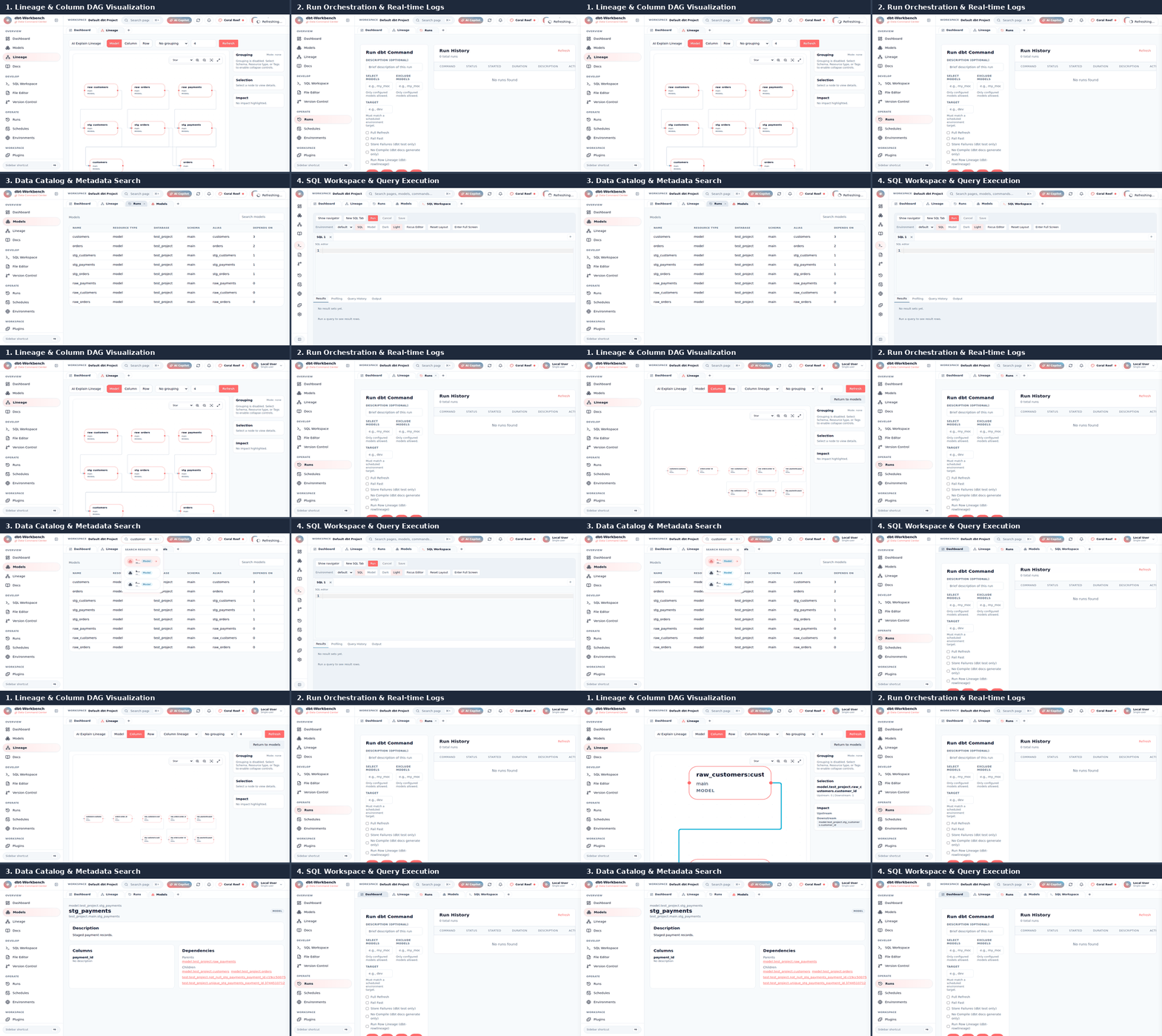
How dbt-Workbench maps to those workflows
- Lineage visualization: deterministic D3/dagre layout, grouping controls, and impact highlighting. See the dbt lineage visualization page.
- Column lineage: column-level graph derived from manifest and catalog artifacts. Learn more in the dbt column lineage guide.
- Run orchestration: execution buttons, log streaming, and run history. See dbt run orchestration.
- Scheduler: cron-style schedules with retries, notifications, and diagnostics. Review the dbt scheduler.
- Catalog and docs: search metadata, test health, and docs previews. Visit the dbt catalog viewer and dbt docs viewer.
- SQL workspace: dual-pane compiled SQL and safe execution. Explore the dbt SQL workspace.
Hosted vs self-hosted dbt UI (vendor lock-in avoidance)
Hosted dbt UI services prioritize convenience but can introduce vendor lock-in, forced upgrades, and restricted network access. A self-hosted dbt UI like dbt-Workbench offers:
- Full control over artifacts, databases, and credentials.
- Support for local, on-prem, and air-gapped operations.
- Workspace isolation with strict path scoping to reduce data leakage.
- Optional authentication and RBAC tailored to regulated environments.
If you need compliance controls or offline deployments, start with the air-gapped and on-prem dbt UI guidance.
Typical dbt-Workbench workflows
- Inspect the latest artifacts in the dbt artifacts viewer and verify docs assets.
- Validate model coverage in the dbt catalog viewer.
- Trigger a run from the dbt run orchestration page and watch logs stream.
- Schedule recurring runs using the dbt scheduler with timezone-aware cron.
- Use compiled SQL in the dbt SQL workspace for safe warehouse querying.
FAQ
Is this dbt Cloud?
No. dbt-Workbench is a self-hosted dbt UI designed for local, on-prem, and air-gapped deployments without vendor lock-in.
Can it run air-gapped?
Yes. dbt-Workbench supports offline deployments by mounting artifacts and disabling optional plugins or networked integrations.
Does it support multi-project workspaces?
Yes. Multiple workspaces are supported with strict path scoping and isolated repositories, artifacts, and settings.
Which dbt artifacts does the UI use?
The UI reads manifest.json, run_results.json, and catalog.json plus docs generate assets for previews.
Is there an authentication option?
JWT authentication with role-based access control is available and optional. Default mode is open for local use.
What workflows can I run from the UI?
Run dbt commands, inspect compiled SQL, browse catalogs, visualize lineage, manage environments, and schedule runs.
Why teams need a dbt UI
As dbt projects grow from a handful of models to hundreds or thousands, managing them through command line alone becomes challenging. A dbt UI solves critical operational needs:
Visual data lineage
Understanding dependencies between models is essential for refactoring, debugging, and impact analysis. Without visualization, teams struggle to answer questions like "What breaks if I change this model?" or "Which models depend on this source?"
Collaboration and documentation
A shared interface enables data analysts, engineers, and stakeholders to explore the data warehouse without SQL expertise. It democratizes access to metadata and reduces "tribal knowledge" dependencies.
Operational efficiency
Running dbt commands, monitoring jobs, and troubleshooting failures become streamlined when centralized in a web interface. Teams save hours weekly through automation and better visibility.
Compliance and governance
Enterprise environments require audit trails, access controls, and data lineage documentation. A proper dbt UI provides these governance capabilities out of the box.
dbt UI options compared
Teams have several options for dbt interfaces, each with different tradeoffs:
dbt Cloud (SaaS)
Pros: Fully managed, collaboration features, IDE, observability
Cons: Vendor lock-in, data leaves your infrastructure, pricing scales with usage, limited customization
Best for: Teams wanting zero operational overhead and ok with SaaS model
dbt-Workbench (Open Source)
Pros: Self-hosted, air-gapped capable, full control, extensible, no usage limits
Cons: Requires infrastructure management
Best for: Security-conscious teams, regulated industries, cost-sensitive organizations, air-gapped environments
Custom internal tools
Pros: Tailored exactly to your needs
Cons: High development cost, maintenance burden, documentation gap
Best for: Large teams with dedicated platform engineering resources
Command line only
Pros: Zero additional infrastructure
Cons: Limited collaboration, no visualization, steep learning curve
Best for: Small teams, individual practitioners
When to choose dbt-Workbench
dbt-Workbench is specifically designed for scenarios where control and flexibility matter:
Air-gapped and on-premise deployments
Financial services, healthcare, and government organizations often cannot use cloud SaaS products due to compliance requirements. dbt-Workbench runs entirely within your network perimeter.
Cost optimization
With unlimited users and runs, dbt-Workbench eliminates per-seat or per-run pricing concerns that SaaS products impose.
Custom integration needs
The plugin system and open API enable custom integrations with your existing data stack, CI/CD pipelines, and internal tools.
Multi-project management
For organizations managing multiple dbt projects across business units, dbt-Workbench's workspace isolation provides clean separation while maintaining centralized governance.
Themes and Appearance
dbt-Workbench includes 9 built-in themes accessible from the theme picker in the top navigation bar:
| Theme | Mode | Description |
|---|---|---|
| Light | Light | Clean default light theme |
| Dark | Dark | Standard dark mode |
| Midnight Marina | Dark | Deep blue ocean-inspired |
| Burj Gold | Dark | Warm gold accents |
| Desert Dusk | Light | Warm earthy tones |
| Oasis | Light | Fresh green palette |
| Harbour Blue | Light | Professional blue (Zoho-inspired) |
| Aurora | Dark | Vibrant purple/pink |
| Coral Reef | Light | Soft coral accents |
Your theme preference is saved to localStorage and persists across sessions.
Getting started with dbt-Workbench
The fastest way to experience dbt-Workbench is with Docker Compose:
docker-compose up --build
This launches the complete stack with a demo project pre-configured. Visit Quickstart with Docker Compose for detailed setup instructions.